Automation isn't your job. Running the business is. I build automations, and keep them running.
MAKE.COM N8N BUILT & MAINTAINED DEDICATED PARTNER
Automation should be its own department, like marketing, sales, or bookkeeping. You don't do your own books; you have an accountant for that. Automation deserves the same treatment: not a task you take on just because you can. I build your automations and keep them running, so you can focus on running the business, not your automations.
You know you need this.
You just shouldn't be running it yourself.
An automation partner means I build the connections between the tools you already use, and then I'm the one who watches them, fixes them, and adds the next one as you grow. You decide what gets automated next.
I am not a freelancer you hire once for a one-off scenario. This is also not a course on how to do it yourself. I see myself as a standing part of your team, doing the thing you already know shouldn't be your job.
- You know automation isn't optional anymore. You just don't want to be the one setting it up, let alone maintaining it. You've got a business to run, not just some automations to build and keep alive.
- You (or someone on your team) already tried building something in Make, Zapier, or n8n, and it turned into a time sink instead of a time-saver.
- You're scaling past what manual work can handle, and every new client means repeating steps you know shouldn't still be manual.
- You genuinely enjoy building and maintaining your own automations. This isn't a rescue mission for that.
- You need one automation, once, and never plan to touch it again. That's a freelancer job, not a retainer.
- Your workflows still change every week. A partner works best once the process has settled enough to repeat.
Systems running here,
right now, all the time.
Are you still losing time and energy over one of the following things?
- An invoice you create by hand every time someone books, pays, or signs up.
- Receipts and invoices you gather by hand and forward to your accountant, maybe into a spreadsheet on the side.
- Leads that land in your inbox, a contact form, or a DM, and just sit there until you remember to follow up.
- A new client says yes, and now five different tools need updating, one by one.
- The same report, rebuilt from scratch every month, same spreadsheet, same afternoon gone.
- Meeting notes that only become action items if you personally chase them.
- Copy-pasting the same information between two tools that should just talk to each other.
One signature on a form, and the whole back office moves.
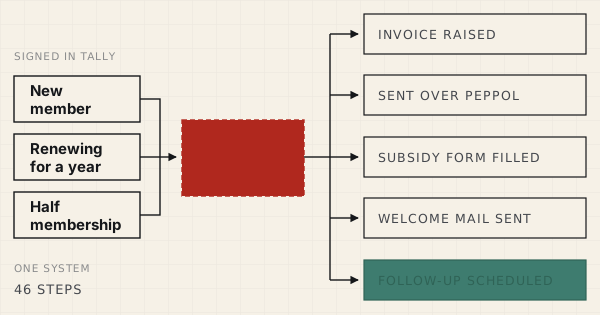
A signed sign-up becomes a verified customer, an invoice over Peppol, and a week of follow-up that schedules itself.
Time saved: almost an hour per sign-up CASE 02A custom quote in their inbox before the form even closes.
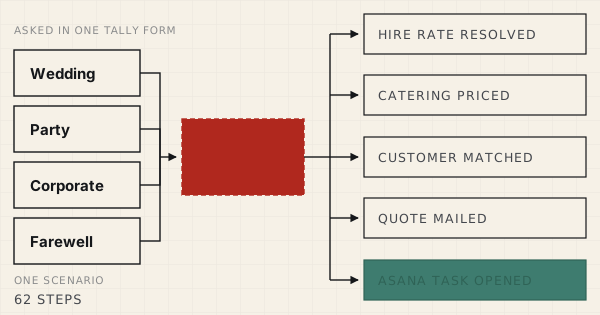
A guest picks their own event, date and menu. The form checks the venue is free, prices it from the client's own catalogue, and mails a signable quote.
Time saved: 30 minutes to half a day per offer CASE 03From tracking project time, to automated invoice, to payment.
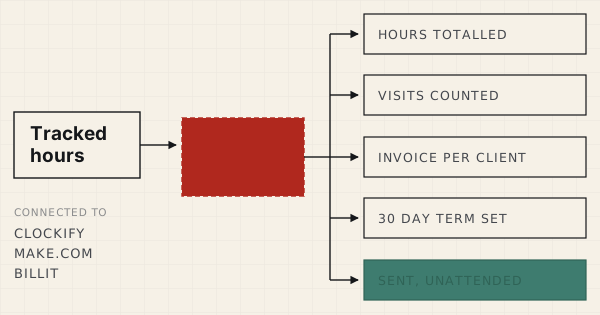
Tracked hours become a sent invoice automatically, every month, with site visits counted and no hour ever billed twice.
Time saved: two to four hours a month CASE 04From a spam-prone contact form, to one that filters itself and files every lead.
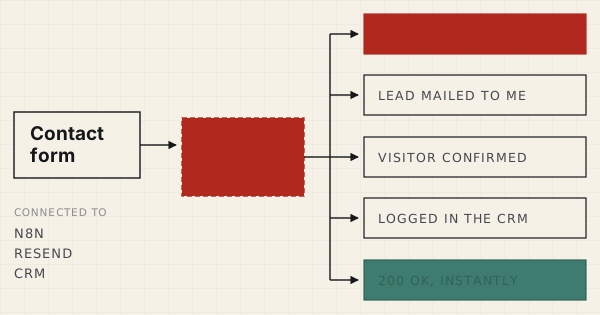
Spam is refused before anything runs. Real leads arrive formatted and are already logged in the CRM, all in the same instant.
Time saved: ~15 min per lead, plus every spam entry blocked CASE 05One enrollment form, five kinds of buyer, and not one invoice made by hand.
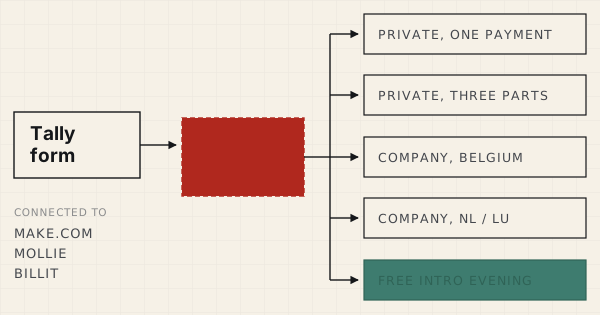
A Tally form wired to Mollie and Billit: a course sign-up worth thousands verifies its own price, picks one of five routes, invoices, and collects itself.
Time saved: the whole admin chain behind every enrollment CASE 06Twelve client websites, measured every Monday, and nobody opens Search Console.
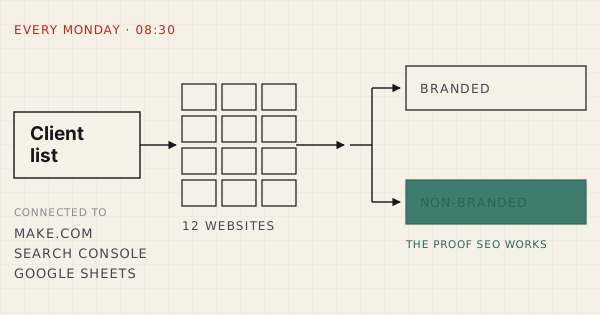
An SEO agency's weekly client reporting, pulled from Search Console by Make.com. Every website measured the same way, with the clicks that prove the SEO works split out.
Time saved: six hours every weekWhat clients say
Frederik, I just wanted to say how happy I am with the automation you did for me on make.com. It's solid and exactly what I needed to get rid of a boring time consuming job :). Good and clear communication, you kept me in the loop, answered questions quickly. I'll be in touch for other automations as I realise now how much valuable time I lose by doing things manually :).
 Reindert Vanderhaeghen, Founder, Vanderhaeghen-IT
Frederik automated the onboarding process for our clients who sign in via an online form. Sending an invoice, adding them to our CRM system, are happening now automatically. Frederik is a reliable professional, with good and fast communication. I can only recommend him!
 Bert Vandebuerie, Co-founder, Foundershub
Four steps. No mystery.
-
01
Book your audit call
A two-way fit check. I want to hear your software stack, your automation experience so far, any platform you're already set on, and what you'd expect from a dedicated automation partner. If we're a match, we move to the fix.
-
02
I map the fix
A personal offer, via one link: what is included and how we work together. No hidden scope, no hourly clock. Pay through the same link, and the retainer starts the moment it clears.
-
03
I build it, and I document it
Whatever we agreed on: new automations, fixes to the ones you already have, or mapping out processes with you or your team. You stay hands-off, I handle the technical side. I even document the automation with a video, walking you and your team through how it works.
-
04
I run it
I monitor it, fix what breaks, and add the next automation as you grow. Automation becomes something that supports and finetunes your business, not something you manage.
Automation, built professionally.
Maintained professionally.
Automation as a service. Most business owners who are looking for an automation get a quote where this is a project price for building the automation and a retainer fee for keeping the automation up and running. I believe this is backwards. I maintain the automations and build them for a monthly project fee, no extra surprises. If anything breaks for whatever reason, I'll handle it no matter what.
- Me as your dedicated partner who builds and manages your automations.
- New automations added as your business grows, scoped together each month.
- Monitoring, adjusting and fixing automations when necessary.
- A documented video library of all automations, explaining what each step does.
- Month-to-month. No lock-in contract.
Why hand this off, instead of learning it yourself?
You could learn Make.com, or n8n. Plenty of business owners do, for a while. But every hour spent debugging a broken scenario is an hour not spent on the one thing nobody else can do for you: running the business.
The operators who are actually scaling right now have already made this call. Not because they couldn't figure automation out. Because they decided it belongs with the other things a serious business hands off: bookkeeping, legal, hosting. Infrastructure, not a side project.
You don't need another operational thing on your plate. You can trust the automations to deliver, because I'm the one who built them, and I'm the one keeping them running.
Things people ask before they start.
01 What exactly does our partnership cover?
Building new automations as you need them, monitoring the ones already live, and fixing anything that breaks, without a separate invoice each time. Think of it as outsourcing the "automation" function of your business, the same way you'd outsource bookkeeping.
02 Why not just hire this out one project at a time?
You can. Plenty of freelancers will build you a one-time scenario. But nobody's watching it after they're paid. When it breaks, and automations do break (an API changes or a form field moves), you're back to doing it manually until you find someone to fix it, or you learn to fix it yourself. A retainer means someone's already responsible before you notice.
03 We already have some automations. Can you take over what exists?
Yes. That's actually the most common starting point. On the audit call I look at what's already running, tell you honestly what's solid and what's fragile, and the retainer starts by stabilizing what exists before adding anything new.
04 What automation platforms do you work with?
My favorite platforms are Make.com and n8n. I am an expert on these two. I can also migrate your existing Zapier flows to Make.com or n8n. I prefer not to build with Zapier.
05 What happens if something breaks?
That's the whole point of our partnership. I monitor and fix what breaks as part of the monthly fee. No separate invoice, no waiting for you to notice something's wrong first.
06 Can I cancel?
Month-to-month, no lock-in contract. If it's not earning its place in your budget, you cancel. I'd rather keep this retainer by being worth it than by trapping you in one.
07 Do I need to be technical?
No. You need to know what's costing you time. I handle the technical side: building it, running it and explaining it.
08 What happens when I cancel?
You keep the automations, as you own the platform where they are built. We stop working together and keeping the automations running is something you do internally from then on. No hard feelings.
Get started
Book a free 45-minute audit call. Fill in the form below and you'll be taken straight to my calendar. I'll walk in using the information that you give me as a starting point.
Automation and me are somewhat the same,
operating in the background, doing its thing with the highest impact possible.
I've been freelancing since 2011. Most of these years, I was a virtual assistant for small business owners. I learned how to build organizational structures that are as simple as possible but with high efficiency.
Throughout those years, I've learned more and more about automation. First Zapier, then Make.com and since a year or two, also n8n. Automation is what I consider a double-edged sword. It can make things easier, faster, but also unnecessarily complicated and over time somewhat stale. Automation is just as alive as your business is. It needs to adapt to your business, change when processes change, software gets replaced or when something has become obsolete.
Just as automation does its thing in the background, I love operating from that position as well. I love to see how an automation connects different things and makes one fluent piece of information of it. I consider automation to be the nerve system of a business: lightning fast and communicating information and data throughout the whole system.
I'm looking for a partnership with people who genuinly help others with their solutions, whether that's through a product or a service. A partnership is built on respect and trust, and communication that stays open and honest. I need to see the impact of what I build, that's what keeps me going. Give me a structural problem to crack and an elegant solution to find, and I'm in my element. There's a real thrill in watching an automation just run.